Create HD Videos with Ease: Clipchamp's No Watermark Free Exports Revolutionize Content Creation
In today's visually-driven world, video content reigns supreme. From captivating social media stories to informative tutorials and engaging marketing campaigns, the demand for high-quality video is insatiable. Yet, for many, the barrier to entry into video editing has been high, often requiring expensive software, advanced technical skills, or the unwelcome intrusion of watermarks on free exports. Enter Clipchamp, a game-changing web-based video editor developed by Microsoft, that promises to democratize video creation with its intuitive tools and, crucially, unlimited HD exports completely free of watermarks.
Clipchamp stands out as a powerful yet incredibly accessible platform for anyone looking to produce stunning visual content without the typical headaches. Whether you’re a beginner taking your first steps into video production, an educator crafting engaging lessons, a small business marketing your brand, or a seasoned creator looking for an efficient workflow, Clipchamp offers a robust suite of features designed to simplify the entire editing process. Its core appeal lies in its commitment to empowering users to tell their stories, share their knowledge, and connect with their audience through video, all while maintaining professional quality and avoiding the common pitfalls of other free editors.
Clipchamp: Democratizing Video Editing for Everyone
The story of Clipchamp began in 2013 as an ambitious Australian startup in Brisbane, founded by a team including former SAP engineers. Their vision was clear: to make video creation accessible to everyone, leveraging browser-based technology to remove the barriers of expensive software and complex installations. This mission to "democratize storytelling" through accessible technology quickly gained traction, recognizing the burgeoning need for user-friendly video tools in an increasingly digital world.
In a significant move that underscored its potential, Microsoft acquired Clipchamp in September 2021. This acquisition marked a pivotal moment, integrating Clipchamp into the expansive Microsoft ecosystem and enhancing video capabilities across personal, educational, and professional use cases within Microsoft 365 subscriptions. Post-acquisition, Clipchamp quickly became a cornerstone of Microsoft's creative offerings, being pre-installed on Windows 11 and readily available via the Microsoft Store and web browser. By the time of its acquisition, Clipchamp had already amassed over 17 million registered users worldwide, a testament to its effectiveness and user-centric design.
At its heart, Clipchamp is a freemium, web-based non-linear video editing software specifically designed for beginners, creators, educators, and businesses who may not possess advanced technical skills. Its emphasis on ease of use and intuitive interfaces ensures that anyone can produce professional-quality videos. The platform's mission to empower users to create and share stories through video, regardless of prior experience, is evident in every feature, making it a true enabler of visual expression for a diverse global audience.
Unlocking Creativity with Intuitive Tools and AI Power
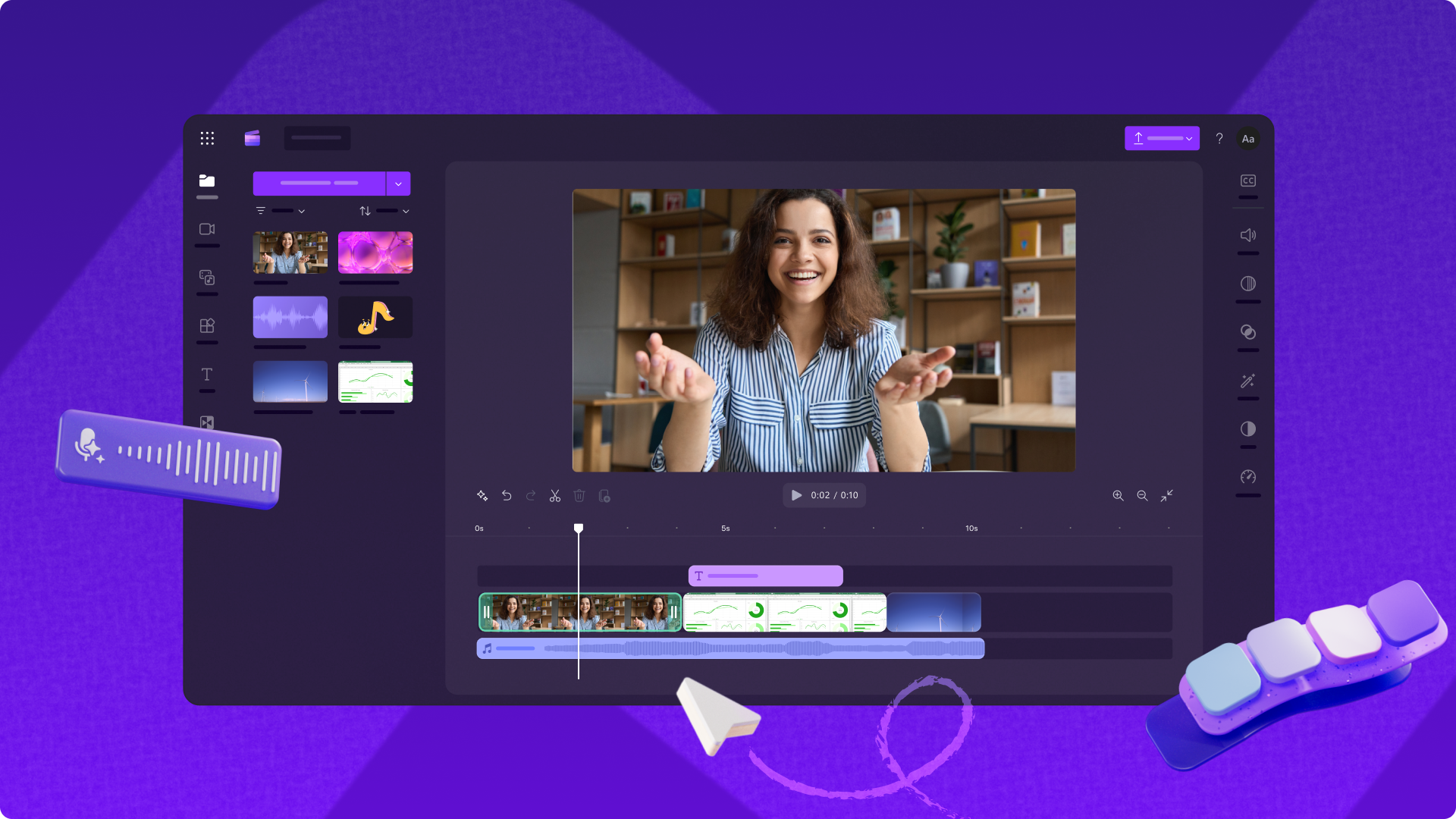
Clipchamp’s strength lies not just in its accessibility but also in its comprehensive set of tools, which strike a perfect balance between simplicity and sophistication. The platform’s drag-and-drop interface is a cornerstone of its user-friendliness, allowing users to effortlessly arrange clips, images, and audio tracks on the timeline without any steep learning curve. This intuitive design transforms complex editing tasks into straightforward actions, making it easy to trim, crop, split, and merge your content with precision.
Beyond basic editing, Clipchamp equips users with powerful built-in recording options that expand creative possibilities:
*
Camera Recording: Directly capture footage from your webcam, ideal for vlogs, personal messages, or quick updates.
*
Screen Recording: Record your computer screen, perfect for creating tutorials, software demonstrations, or gaming content.
*
Voiceovers: Easily add narration to your videos, providing context, explanation, or a personal touch.
One of Clipchamp’s most compelling advantages, and a key highlight of its offering, is the provision of
unlimited HD exports without watermarks on its free plans. This feature alone sets it apart from many competitors, allowing creators to produce professional-looking videos without any branding impediments, making it an invaluable resource for anyone publishing content online. Whether you’re uploading to YouTube, TikTok, Instagram, or presenting a school project, your videos will look polished and professional, free from distracting overlays.
Moreover, Clipchamp integrates cutting-edge AI-powered features that significantly enhance the editing experience:
*
Automatic Subtitle Generation: Available in over 100 languages, this feature is a boon for accessibility and global reach. It automatically transcribes spoken words, saving countless hours of manual effort and ensuring your content is understood by a wider audience.
*
Voiceover Synthesis: Transform text into natural-sounding speech with customizable pitch and pace. This tool is perfect for creating consistent narration, experimenting with different voices, or producing content quickly without needing to record your own voice.
*
Audio Enhancement Tools: Intelligently remove background noise, eliminate awkward pauses, and even identify and remove filler words (like "um" and "uh") for clearer, more professional-sounding audio tracks. Good audio is often overlooked but crucial for viewer engagement, and Clipchamp's AI makes it easier than ever to achieve.
To further streamline production, Clipchamp provides access to a vast library of royalty-free stock videos, images, music, and templates. This rich resource allows users to quickly find the perfect assets to complement their content, eliminating the need to search for external media and ensuring legal compliance. From social media content and educational tutorials to compelling marketing videos and personal storytelling, Clipchamp offers the tools and resources to bring any vision to life. To dive deeper into harnessing these smart features, you might find great value in exploring articles like
Master Video Editing with Clipchamp: Beginner-Friendly AI Tools.
Seamless Integration and Cross-Platform Accessibility
Clipchamp's operational model is a core hybrid design, supporting browser-based editing while leveraging local processing for optimal performance. This ingenious approach ensures that users can access powerful editing capabilities directly through modern web browsers like Google Chrome, without needing to download heavy software. Simultaneously, it uses local device resources for smooth rendering, then seamlessly integrates with Microsoft cloud storage services for project management and secure collaboration, especially valuable for those within the Microsoft 365 ecosystem.
The platform's deep integration with Microsoft services significantly enhances its utility. Users can easily connect their content with social networks, save videos securely to OneDrive for cloud storage and sharing, and leverage its capabilities within collaborative tools like Microsoft Teams. This interconnectedness makes Clipchamp a natural choice for individuals and teams already operating within the Microsoft environment, simplifying workflows and promoting efficient content creation.
Clipchamp boasts impressive cross-platform support, ensuring flexibility for creators on the go or those working across multiple devices. It's available as:
* A dedicated Windows app, pre-installed on Windows 11 and accessible via the Microsoft Store.
* A web-based editor, compatible with major modern browsers, offering instant access without any downloads.
* An iOS mobile application, enabling convenient on-the-go editing from your iPhone.
This versatility means you can start a project on your desktop and continue refining it on your tablet or smartphone, maintaining productivity wherever you are. For more detailed insights into its availability across different platforms, consider reading
Microsoft Clipchamp: Free Video Editor for Windows 11 & Web. While the free plan offers unlimited HD exports without watermarks, Clipchamp also operates on a freemium model. Premium features, such as 4K exports, access to an extended stock library, and advanced effects, are unlocked through Microsoft 365 plans, catering to users who require even more professional capabilities.
Tips for Maximizing Your Clipchamp Experience
To truly leverage the power of Clipchamp and create stunning HD videos easily, consider these practical tips:
1.
Start with a Template: Especially if you're new to video editing, Clipchamp's diverse collection of ready-to-use templates can be a fantastic starting point. They provide a professional structure and design, allowing you to simply drop in your content and customize it.
2.
Utilize AI for Efficiency: Don't overlook the AI features. Automatically generated subtitles save immense time and boost accessibility. Experiment with text-to-speech voiceovers for consistent narration or to quickly iterate on scripts. The audio enhancement tools can make a significant difference in the perceived quality of your video.
3.
Leverage the Stock Library: Need B-roll footage, background music, or engaging images? Clipchamp’s integrated stock library is a treasure trove of royalty-free assets. Use them to fill gaps in your footage, set the mood, or add visual interest without extra cost or copyright worries.
4.
Master the Recording Tools: If you're creating tutorials, screen recording is indispensable. For personal vlogs or direct addresses, the camera recorder is perfect. Combine these with the voiceover feature for comprehensive and engaging content.
5.
Optimize for Your Platform: When exporting your HD video, consider where it will be published. Clipchamp allows easy sharing to platforms like YouTube, TikTok, and OneDrive. Keep aspect ratios and video length in mind for optimal performance on each social media channel.
6.
Stay Organized: With Clipchamp's cloud integration, especially for Microsoft 365 users, saving your projects and assets to OneDrive ensures they are securely stored and accessible from anywhere, facilitating collaboration and preventing data loss.
7.
Experiment with Effects: Explore the range of transitions, filters, and effects Clipchamp offers. Even subtle additions can significantly enhance the visual appeal and storytelling flow of your videos.
Conclusion
Clipchamp has firmly established itself as a frontrunner in accessible video editing, brilliantly fulfilling its mission to democratize storytelling. By offering intuitive tools, powerful AI features, and most notably, unlimited HD exports without watermarks on its free plan, it removes significant barriers for aspiring and established creators alike. Its seamless integration into the Microsoft ecosystem and cross-platform accessibility further cement its position as a go-to solution for anyone looking to create, edit, and share high-quality video content with unprecedented ease. Whether you’re crafting a quick social media post, a detailed tutorial, or a compelling marketing video, Clipchamp provides the professional-grade capabilities you need, ensuring your stories are told clearly, beautifully, and without compromise.